Dancers Life

Now in beta · For dancers & choreographers

From first rehearsal to final pay — one show, start to finish.

Rehearsal scheduling, show-day check-ins, rates and pay slips — all in one place, instead of a WhatsApp group and a spreadsheet.

Coming soon to the App Store See how it works

iPhone app · English / 中文 · Ages 16+

The Shows tab: an invite waiting for a reply, a show you run, and shows you're in

How it works

Five steps, from the first message to the last payment

The first version of Dancers Life does one thing well: helping choreographers and dancers get a show done.

Screens below are shown in Traditional Chinese — the app is fully available in English too.

01

No more asking “who’s free?” one by one

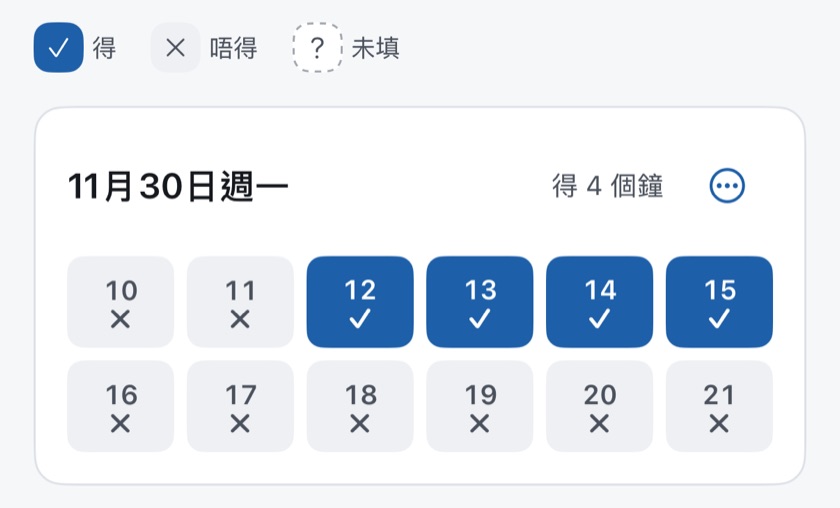
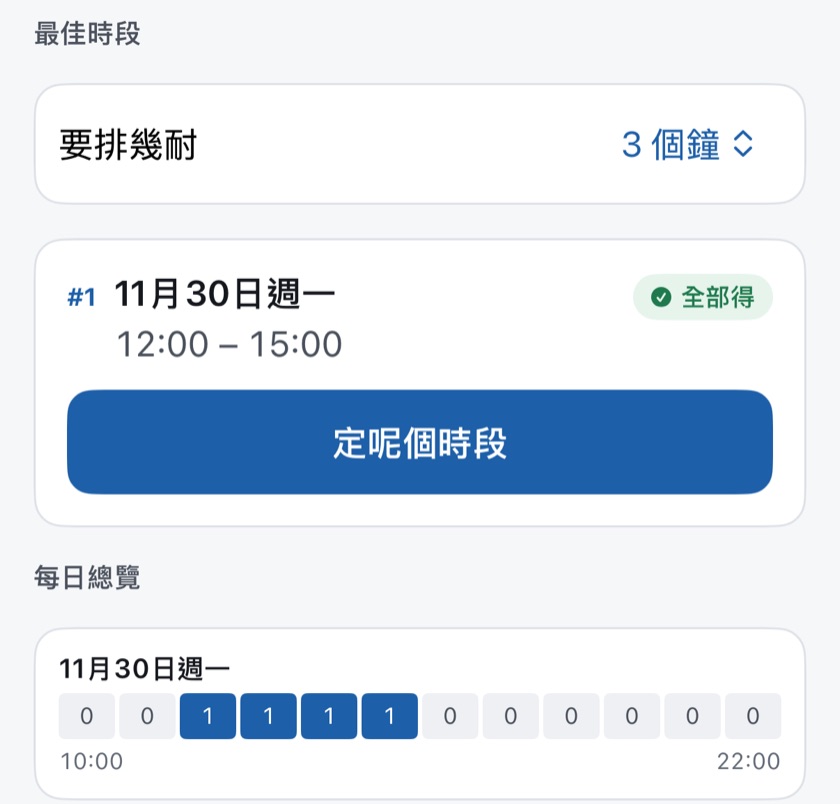
The choreographer creates the show and picks candidate dates. Dancers tap the hours they can and can’t make. The app finds the slots that work for the most people, and the choreographer locks one in with a tap.

  • Dancers mark each hour as available or not
  • Choreographers see the best slots and an hour-by-hour overview
  • Changes save automatically
Availability card for Monday 30 November: hours 12 to 15 marked available, the rest marked unavailable
DancerTap to mark your hours
Best time slot: Monday 30 November, 12:00 to 15:00, everyone available, with a button to confirm the slot and an hour-by-hour overview
ChoreographerBest slot, confirmed in one tap

02

Every show gets its own page

Notices, sessions, availability, people and pay each have their own tab, so everyone works from the same information. Each person can have their own call time and wrap time.

  • Invite dancers with a single link — send it on WhatsApp
  • Dancers request to join; the choreographer approves
  • Pinned announcements the whole group can see
A show page on the Members tab: invite button, one pending request to join with Approve and Decline, and the member list

03

Arrive, tap, checked in

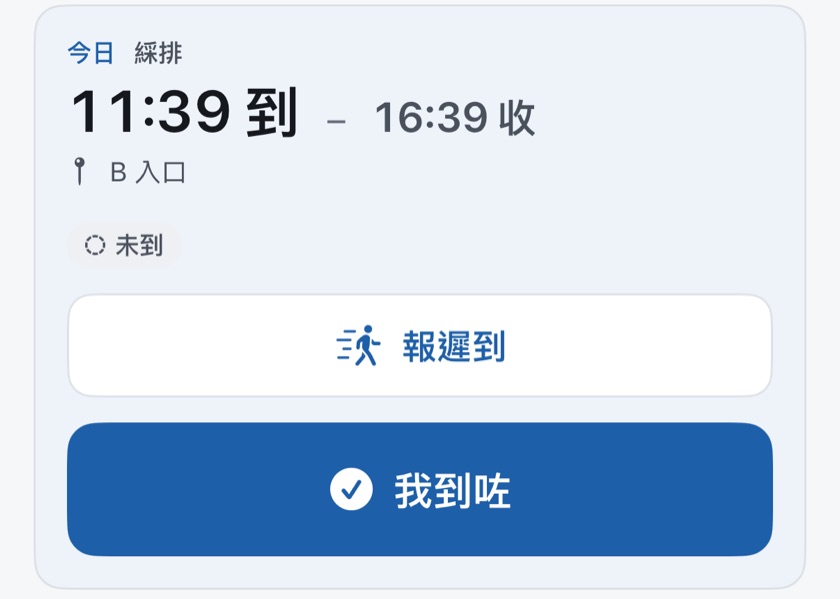
Today’s call time, wrap time and entrance are right at the top. Tap “I’m here” when you arrive — or “Running late” if you’re stuck in traffic, so the choreographer knows straight away.

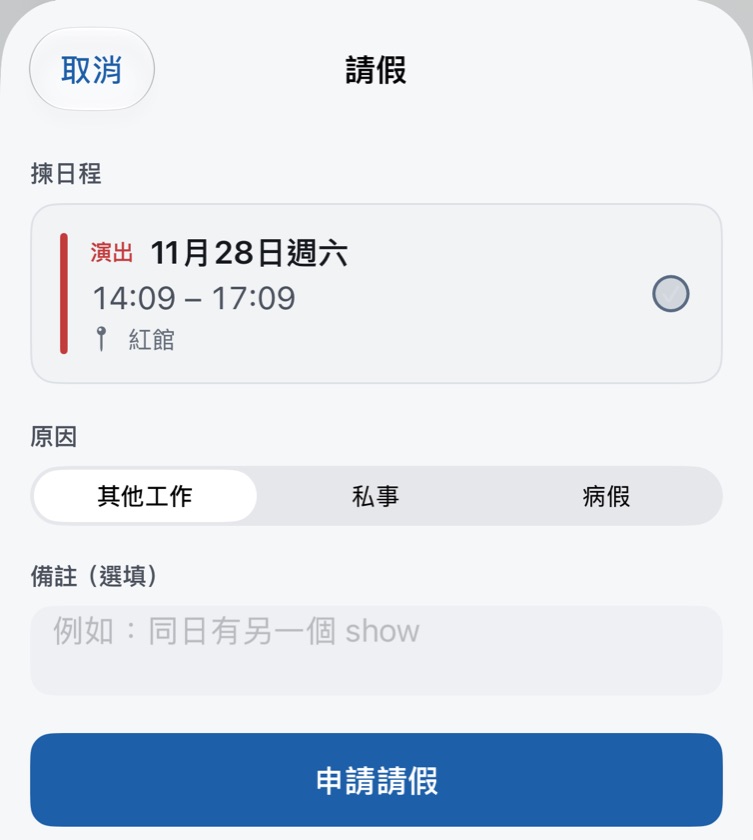
Another job, something personal, or unwell? Pick the date and request leave in the app. Once the choreographer approves, both sides see it.

Today’s rehearsal card: arrive 11:39, wrap 16:39, entrance B, with Running late and I’m here buttons
DancerOne-tap check-in
Leave request sheet: choose the show date, a reason (other job, personal, sick) and an optional note
DancerRequest leave for approval

04

Your rate is between you and the choreographer

Choreographers set a show fee and a rehearsal fee for each person — or one package rate. Dancers can accept, or propose a different rate.

Other dancers can’t see your rate. The app never sends it to their phones in the first place.

My rate card, labelled ‘only you and the choreographer can see this’: HK$3,000 per show and HK$500 per rehearsal day, with Negotiate and Accept buttons
DancerAccept or negotiate

05

After the show, the numbers add up

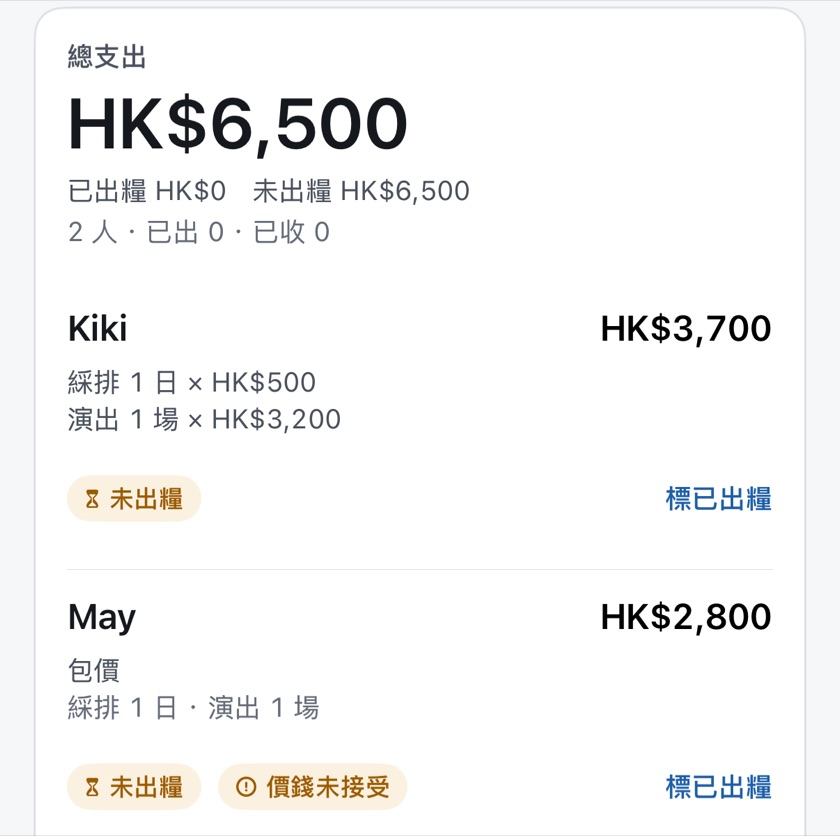
Every dancer gets a pay slip: rehearsal days, shows and the total. Choreographers see the total spend and who’s been paid, and mark each person as paid. Dancers mark it as received — or report a mismatch if something doesn’t add up.

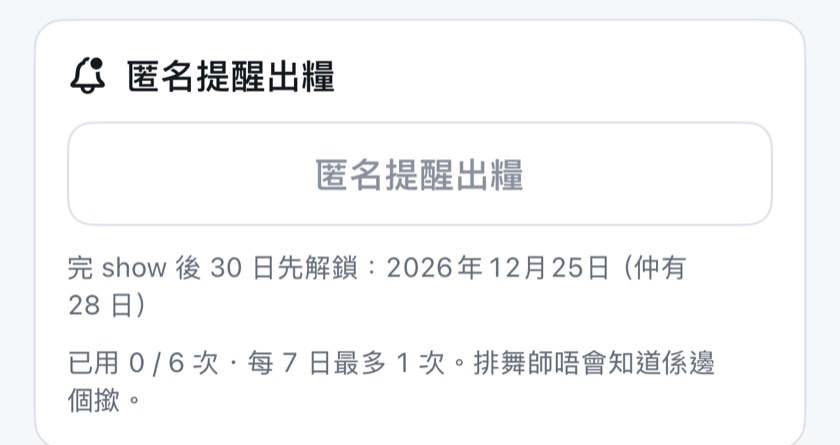
Still unpaid 30 days after the show? Send an anonymous reminder. The choreographer only learns that someone asked — never who. Limited to once every 7 days.

My pay slip, marked paid: 1 rehearsal day at HK$500 and 1 show at HK$3,200, total HK$3,700, with Report a mismatch and Mark received buttons
DancerPay slip — mark it received
Choreographer’s payroll: total spend HK$6,500 across two people, each with their breakdown, unpaid status and a Mark paid link
ChoreographerTotal spend, mark each as paid
Anonymous pay reminder: unlocks 30 days after the show, used 0 of 6, at most once every 7 days; the choreographer won’t know who sent it
DancerAnonymous reminder

Inside the app

Three tabs. That’s it.

Shows, Calendar and Me — nothing extra to think about when you’re on the job.

  • The Shows tab with an invite, shows you run and shows you’re in

    Tab · Shows

    Your shows

    Shows you run, shows you’re in, and invites waiting for you

  • A show page with tabs for notices, sessions, dates, people and pay

    Show page

    The whole show on one page

    Notices, sessions, availability, people and pay

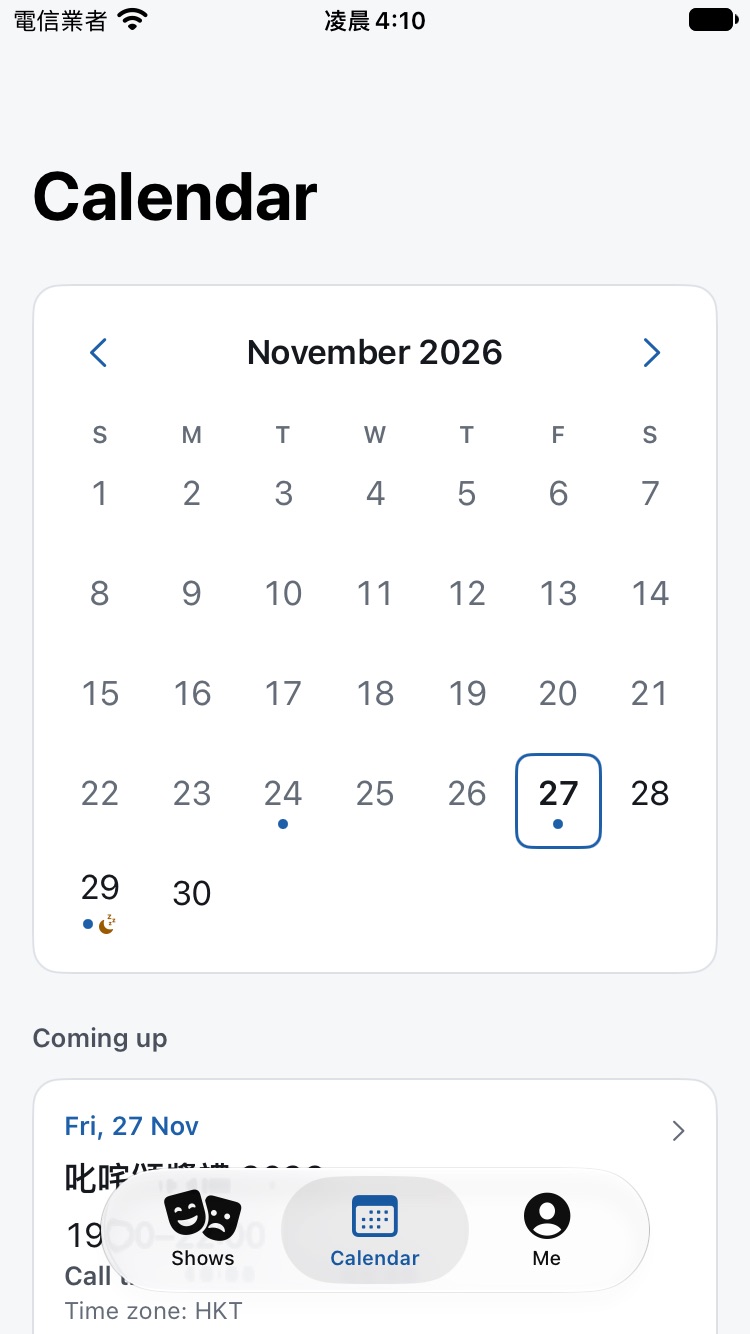
  • The Calendar tab showing November 2026 with dots on rehearsal and show days

    Tab · Calendar

    Every date at a glance

    Rehearsals, show days and upcoming call times

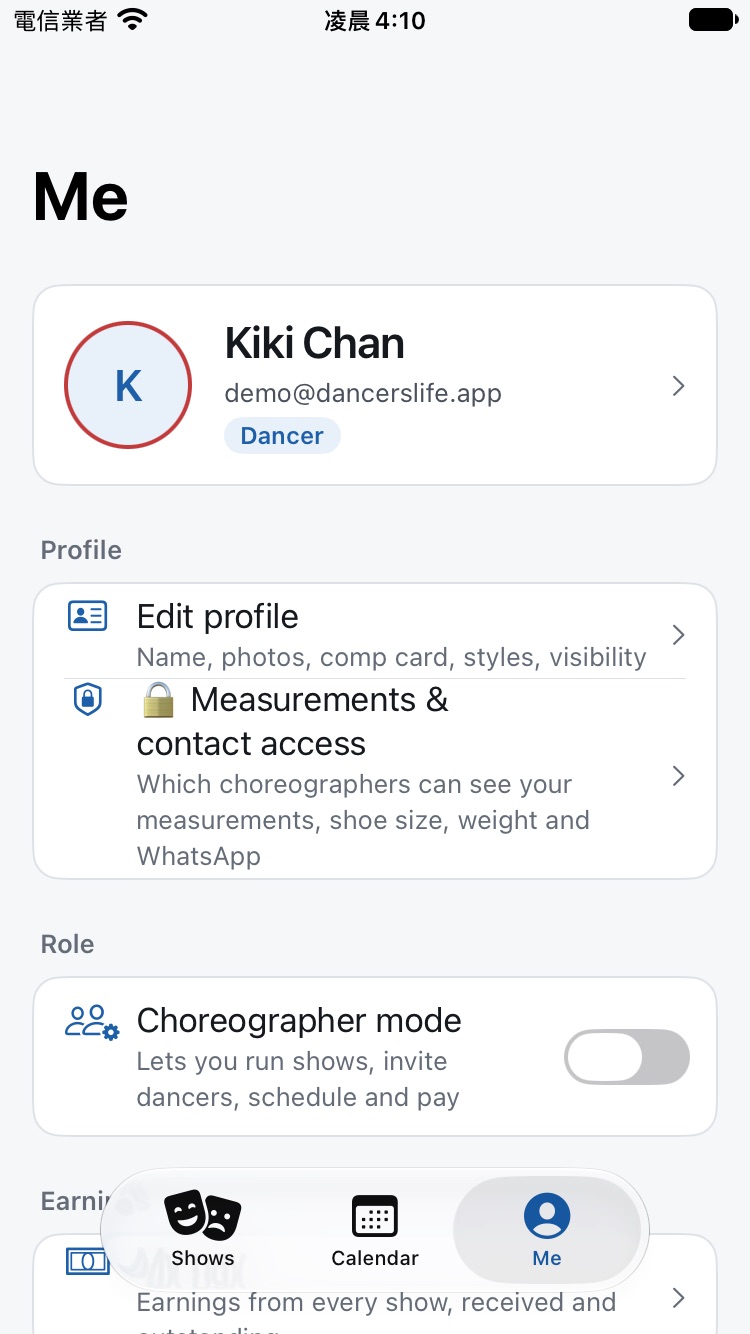
  • The Me tab with profile, measurements and contact access, and the Choreographer mode switch

    Tab · Me

    Your profile and settings

    Profile, earnings and the Choreographer mode switch

Dancers & choreographers

One account, two roles

Everyone starts as a dancer. Choreograph too? Switch on Choreographer mode in the Me tab to run shows, invite dancers, schedule and handle pay — no second account needed.

For dancers

Know when you’re working, what you’re earning, and when you’ll be paid

  • Mark when you’re free
  • See your call time and check in
  • Report running late, request leave
  • Accept or negotiate your rate
  • View pay slips, mark them received
  • Send anonymous pay reminders

For choreographers

Your whole team and the whole show, in one place

  • Create a show and invite dancers by link
  • See the best rehearsal slots and confirm
  • Post announcements, set the schedule and call times
  • Approve leave requests
  • Set rates per person or as a package
  • Track total spend and mark people paid

Privacy & safety

When money’s involved, privacy comes first

Private rates

Each person’s rate is visible only to them and the show’s choreographer.

Anonymous reminders

Pay reminders never show your name, and they’re rate-limited so they stay a nudge, not spam.

Report & block

If someone or an invite doesn’t feel right, report or block them. Every report is reviewed by a person.

Delete any time

Delete your account from the Me tab, and your data is removed right away.

No money through the app

Dancers Life keeps track of pay and lets you mark it — it never handles the money itself.

Ages 16+

Dancers Life is for people aged 16 and over.

In beta on TestFlight

Coming soon to the App Store

Dancers Life is being tested right now and will be on the App Store soon, with more to come after launch. Questions or ideas? We’d love to hear from you.

[email protected]